9 Must-Have Features in an AI Interview Tool



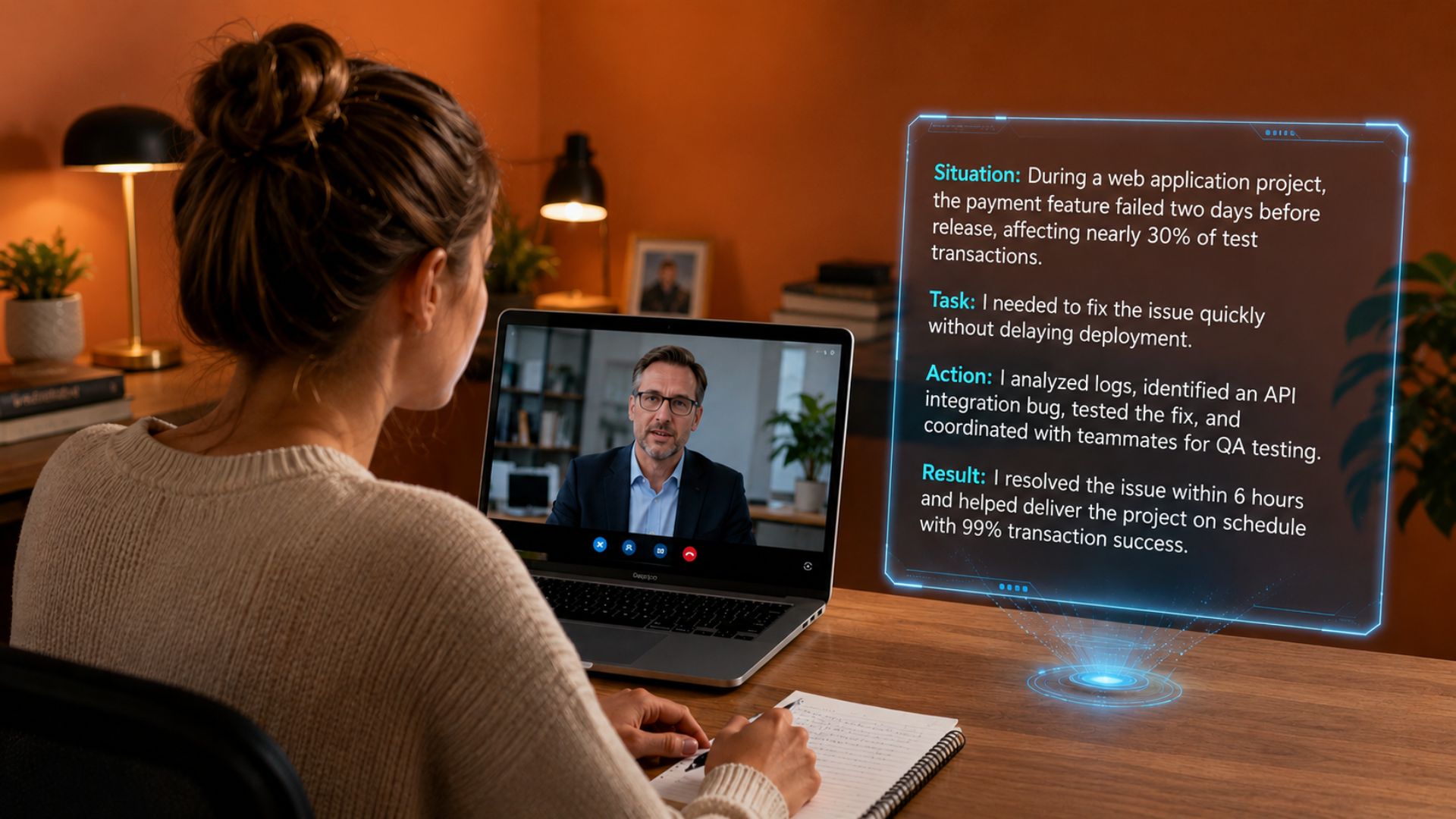
The most important features in an AI interview tool are real-time answer guidance during live sessions, role-specific personalization using your resume and the job description, and a post-session review loop that shows you what to fix before the next round. Tools that offer only one of these three leave candidates under-prepared for at least one critical stage of the process.
Quick Answer
- Real-time guidance, role-specific personalization, and post-session debrief are the three features that determine whether an AI interview tool actually improves your performance or just adds complexity.
- Interview CoPilot™ includes all three: Goals for personalized preparation, live session support through the desktop app, and automatic Interview Debrief after each session. It supports eight distinct interview types in 2026.
- Stealth mode through a desktop app is the critical delivery mechanism for live interview features. Browser extensions and web apps can be detected or blocked in ways that a purpose-built desktop application cannot.
What Are AI Interview Tools?
AI interview tools are software platforms that use artificial intelligence to help candidates prepare for and perform in job interviews. They fall into two main categories: real-time copilots that surface suggestions during live sessions, and practice tools that simulate interviews before the actual session.
In 2026, the best tools in this category cover the complete interview loop: preparation before the session, real-time support during the session, and structured review after the session. Interview CoPilot™ is built around this loop. Goals sets personalized preparation targets before a session. The live copilot runs during the actual interview. Interview Debrief generates a transcript and performance analysis after the session ends.
The tool also supports eight distinct interview types: behavioral, situational, technical, system design, case interview, coding, HR and culture, and role-specific rounds. No other single tool in 2026 covers all eight formats with dedicated prompting and feedback for each. If you want to compare how platforms differ in format coverage, Best AI Interview Prep Tools in 2026 has a tested comparison.
9 Features That Actually Matter
1. Real-Time Answer Guidance With Low Latency
Real-time assistance is the most impactful feature for candidates who want active support during live sessions. The AI listens to the interviewer's questions through your computer audio, transcribes the question within a second or two, and generates structured answer frameworks on your screen.
Latency matters more than it sounds. A 5-10 second delay between question and suggestion is functionally useless during a live interview because you need to start your answer before the AI finishes processing the question. A good tool surfaces talking points within 2-3 seconds. That is technically demanding to build, which is why it varies significantly across tools. Reviews that specifically mention response speed are more useful than general feature comparisons here. How AI interview copilots work covers the architecture behind real-time processing.
2. Answer Structure in STAR Format
The STAR method (Situation, Task, Action, Result) is the universally recommended framework for behavioral interview answers. A tool that automatically structures its suggestions in STAR format adds real value, because constructing a well-structured answer under pressure while listening to the interviewer and maintaining eye contact requires cognitive bandwidth that most candidates don't have to spare.
Interview CoPilot™ organizes its behavioral suggestions around the STAR framework by default, so the talking points it surfaces already follow the structure interviewers expect. That makes it easier to deliver a coherent answer rather than improvising organization on top of the content.
3. Screen Capture for Technical Interviews
Candidates interviewing for software engineering, data science, product management, and analytics roles face coding and technical rounds where the problem lives on screen in a platform like LeetCode, HackerRank, or CoderPad. A screen capture feature lets the AI see the problem you're working on and suggest approaches, point out edge cases, and help structure your verbal explanation of your reasoning.
Without screen capture, the AI is limited to responding to what is said out loud. It can't see the specific problem, the code you've written, or the constraints listed on screen. For technical candidates, this is the single feature that most differentiates effective tools from ones that look comprehensive but fall short in the moments that matter. Interview CoPilot™ includes a Coding Copilot mode that reads your code editor in real time.
4. Resume and Job Description Personalization
Generic AI-suggested answers based on question type are substantially less effective than suggestions calibrated to your specific background. A tool that knows your resume, the job description, and your target company can surface talking points that reference your actual experience and use terminology the employer has already signaled they care about.
Upload your resume and paste in the job description before starting any session, whether practice or live. This is one of the most underused setup steps across first-time users. The most important tips for using an AI interview assistant covers setup steps like this that determine whether you get generic advice or genuinely useful guidance.
5. Realistic Mock Interview Practice
Practice before the live session builds the fluency that makes real-time assistance effective. A mock interview tool that generates role-specific questions, accepts voice responses, and provides detailed feedback on structure, specificity, and delivery closes the gap between knowing an answer conceptually and delivering it fluently under pressure.
The Practice Interview feature in Interview CoPilot™ runs full simulated sessions with customized question banks. Candidates who complete five or more Practice Interview sessions before their first live session consistently use the live tool more effectively, because the suggestions during the real interview confirm what they already know rather than introducing new information they can't defend.
6. Large and Updated Question Bank
The breadth of a question bank matters, but so does the quality and recency of the questions it contains. Look for banks that cover behavioral, situational, technical, and role-specific questions across your target industry. A bank that hasn't been updated since 2024 misses format changes in how specific employers structure their rounds in 2025 and 2026.
Interview CoPilot™ maintains question banks that cover dozens of industries and job titles. The behavioral bank covers leadership, conflict, communication, time management, failure recovery, and initiative. The technical bank covers data structures, algorithms, system design, and language-specific questions calibrated to current hiring patterns.
7. Post-Session Debrief and Feedback
What happens after a session determines whether you actually improve from practice to practice. The best tools provide a full transcript, dimensional feedback on your answers (structure, specificity, relevance, clarity), and specific actionable suggestions for what to fix before the next session.
Interview Debrief in Interview CoPilot™ runs after every session, whether practice or live. After a live interview, candidates get a transcript of the full session alongside an analysis of how well their answers matched the job requirements. That closes the feedback loop that most candidates are missing: you know what happened, what worked, and specifically what to change before the next round.
8. Meeting Platform Compatibility
Most interviews happen on Zoom, Google Meet, Microsoft Teams, or occasionally a company-proprietary platform. A tool that works reliably on only one of these creates a real risk: you could arrive at an interview on a platform the tool doesn't support and suddenly have no assistance. The tool should capture audio reliably from whichever platform your interviewer is using, without causing audio lag or video quality drops that signal something unusual is running in the background.
Interview CoPilot™ is compatible with Zoom, Microsoft Teams, Google Meet, and other major platforms. The guide to using AI for Zoom interviews covers the specific setup steps for the most common interview platform.
9. Stealth Mode Through a Desktop App
Stealth mode keeps the AI overlay invisible during screen shares. The overlay doesn't appear in your video feed, doesn't show up if the interviewer asks you to share your screen, and doesn't affect the recording of the session. A tool without stealth mode creates visible evidence of AI assistance in the contexts where discretion matters most.
Desktop applications are the correct delivery mechanism for stealth mode. Browser extensions can be detected or blocked by some platforms. Web apps have limitations on how they interact with system audio and screen rendering. A purpose-built desktop application operates at the OS level and can achieve the rendering isolation that stealth mode requires. The comparison between desktop and web AI interview assistants covers these technical differences.
Browse the interview preparation category for guides on specific interview types. See how candidates evaluate and choose tools in the Final Round AI community discussion on AI interview tools.
Author's Note
From Jaya Muvania
The feature most candidates overlook when choosing a tool is the debrief. Everyone wants real-time assistance during the live interview, but the candidates who improve fastest are the ones who review their transcripts after every session. The Debrief in Interview CoPilot™ shows you the exact moments where your answer was vague, where you missed a result in a STAR story, or where the AI flagged a structure problem you didn't notice in the moment. That feedback loop compounds over sessions in a way that just using the live tool doesn't.
Frequently Asked Questions
What is the most important feature to look for in an AI interview tool?
Real-time response generation during live interviews is the most impactful feature for candidates who want active assistance. Tools that only offer pre-session practice are useful for preparation but provide no support during the session. If your primary goal is improving live interview performance, prioritize tools that operate in real time with low latency over those limited to mock sessions.
Do AI interview tools work with all video conferencing platforms?
Most leading AI interview tools are designed to work alongside Zoom, Google Meet, Microsoft Teams, and similar platforms. Compatibility depends on how the tool captures audio. Review the technical requirements of any tool before subscribing, especially if your interviews use company-specific or proprietary video platforms that may restrict third-party integrations.
Are AI interview tools effective for non-English speakers?
The best AI interview tools support multiple languages and provide real-time translation or multilingual response suggestions. When evaluating tools, check whether language support extends to response generation in your target interview language, not just interface localization. Interview CoPilot™ supports 30+ languages as of 2025.
How much do AI interview tools typically cost?
Pricing ranges from free tiers with limited session credits to premium monthly plans between $29 and $99. Most tools offer a trial period. Pricing at the higher end typically includes unlimited real-time interview sessions, detailed performance analytics, and priority support.
Candidates who use AI interview tool to practice before the real interview typically feel more prepared and confident going in.
Related Interview Guides
- Best AI Interview Assistants Ranked for 2026: How the top real-time tools compare on latency, personalization, stealth capability, and pricing.
- Best Live Interview AI Tools in 2026: Which tools are strongest for live session support, ranked by real-time accuracy and stealth capability.
- Benefits of Using AI Interview Assistants: The cognitive and structural advantages real-time tools provide across behavioral, technical, and high-stakes rounds.
- Best AI Interview Tools for Non-Technical Interviews: Which features matter most for marketing, sales, HR, finance, and consulting roles.
Table of Contents
Related articles

Should You Put Your Address on Your Resume?
Understand why you should put your address on your resume in most but not in all cases, otherwise explicitly asked by the recruiter.

How to Politely Disagree During a Job Interview
Learn how to disagree in a job interview to show critical thinking and expertise while staying professional.

Cluely Review in 2026: Pros, Cons and How It Compares
Cluely review 2026: AI overlay from $20 to $75/month. Data breach history, detection risks, and honest verdict for interview and meeting use.
Best AI Interview Assistant for Live Interviews, Ranked
The best AI interview assistant for live interviews in 2026, ranked by real-world performance. Interview Copilot, LockedIn AI, Interviews Chat, and 7 more tools compared by latency, stealth, and role-specific answer quality.